Line Breakpoint Arrows
Breakpoint arrows let you place arrow heads, dots, or other markers at the bend points of a multi-segment line. This is useful for showing flow direction or decorating complex paths.
Adding Breakpoints to a Line
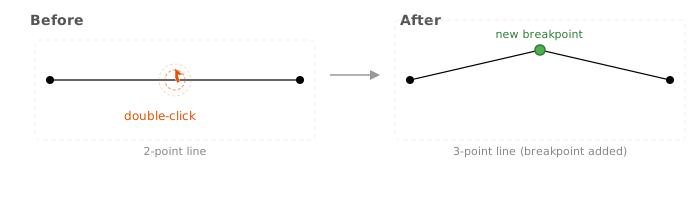
Section titled “Adding Breakpoints to a Line”A breakpoint is created when a line has more than 2 points. To add a breakpoint, double-click on any segment of an existing line. A new bend point will appear where you clicked, splitting the segment into two.
Setting a Breakpoint Arrow Type
Section titled “Setting a Breakpoint Arrow Type”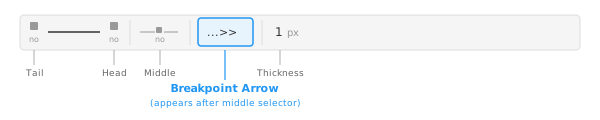
- Click on a line to select it.
- In the toolbar, find the Breakpoint Arrow selector — it appears after the middle arrow selector.
- Click it and choose a shape. You can pick from arrows, dots, bars, arcs, and more.
Examples
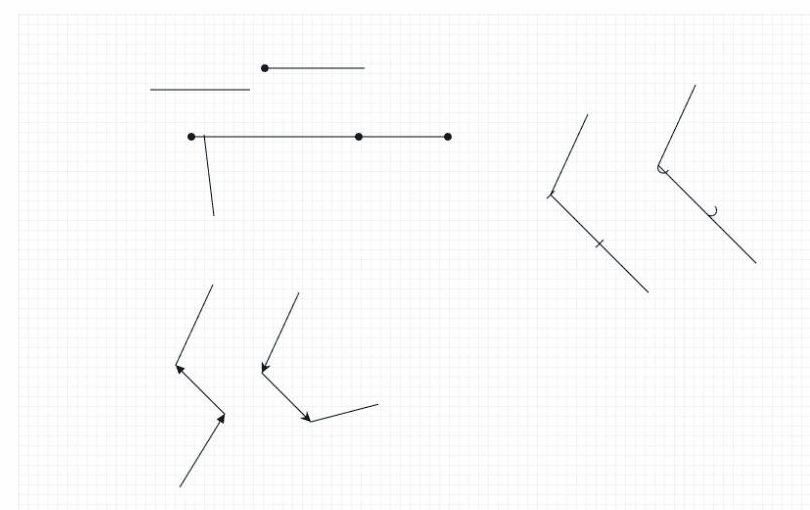
Section titled “Examples”Below are lines with different breakpoint marker types applied:
Works with All Line Types
Section titled “Works with All Line Types”Breakpoint arrows are supported on both straight lines and curved (cubic bezier) lines. On curves, the marker direction follows the curve at the bend point.